citydb-3dtiler
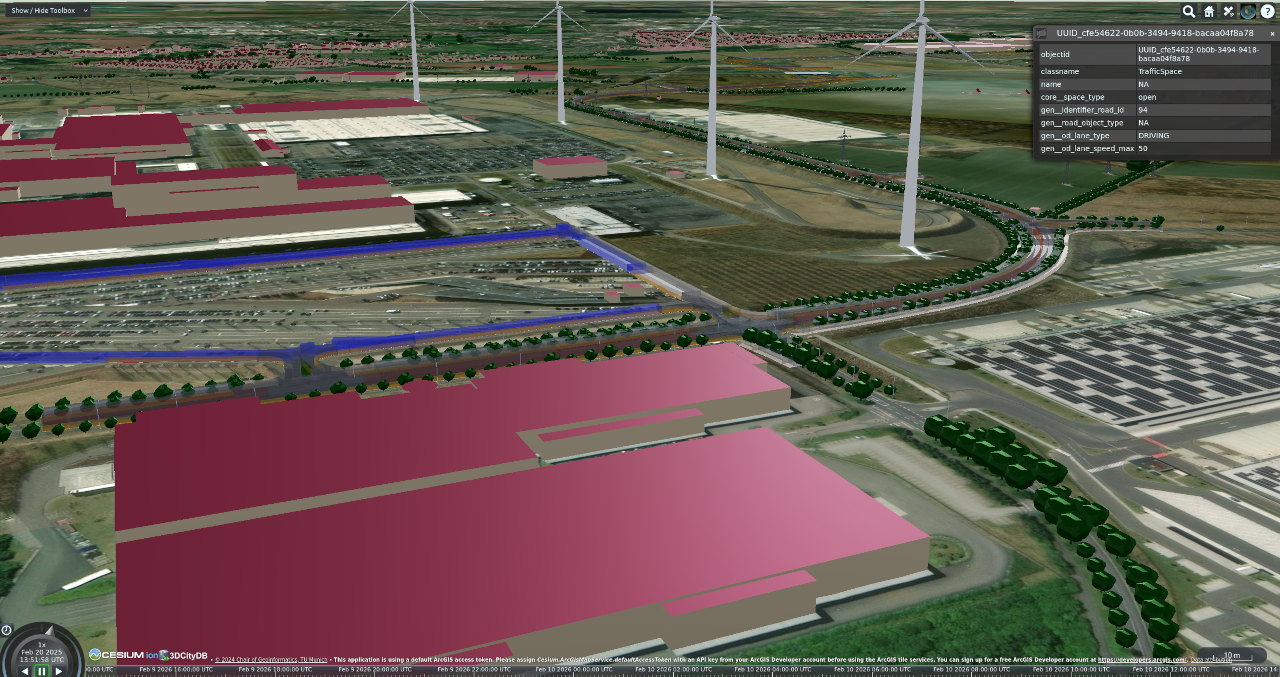
This application is in the testing phase
This application is still in the testing phase. Please exercise caution when using it in production. Therefore, feedback is always welcome. Please feel free to create an issue on the GitHub page or contact me: murat.kendir(At)tum.de
citydb-3dtiler can generate 3DTiles (v 1.0 and 1.1) by reading features (formerly known as "cityobject"s) from 3DCityDB (v5.x), a database application that can import CityGML 2.0 or 3.0-based datasets. The application's key features are as follows:
Key features
- creates singular or separate 3DTiles (based on object classes) by reading the features from the 3DCityDBv5.
- generates report (advice.yml) about the existing data in the database and calculate the most efficient configuration parameters for creating 3D Tiles.
- can assign simple colors or PBR materials based on object classes or the specified property values of features.
- The PBR Materials of the 3D Tilesets can be customized with a CSV file by listing objectclasses and properties.
- features can be filtered using SQL or CQL2 expressions
- filters the features using different criterias such as id, limit, start-index, boundary box or type-name (object class)
- filters the relevant attributes and can flatten the structure of complex attributes (such as con:Height)
- supports 3DTiles v1.0 and v1.1
- The Execution Times of the tiling mechanism depends on the given command, available dataset and the hardware. If you are curious about the execution times of some previously generated test visit this page.
Special Thanks
This application is based on two important concepts and aims to bridge the gap between the concepts 3DTiles and CityGML. To bridge this gap, two main elements have been used in this software: 3DCityDB v5, pg2b3dm
We would like to take this opportunity to thank Bert Temme, the developer of the pg2b3dm library, and all 3DCityDB developers.
Simple Usage (via Docker)
There are two different ways to use citydb-3dtiler: using Docker containers and setting up a Python environment on the local computer to run the application. Both methods are explained in more detail on the relevant pages (How to use with Docker, How to use with Python Env). Below, Docker usage will be explained with only the fundamental steps.
Step-1 : Customization of the Materials (Optional)
If you do not want to customize
If you do not want to customize the feature colors (materials), proceed to Step 4. Otherwise, follow the next instructions.
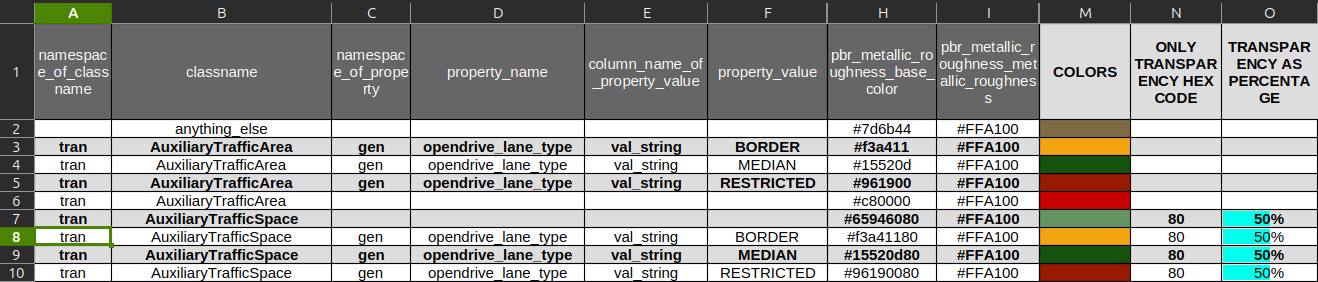
Download and customize the "materials_for_features" file with one of office software (LibreOffice, OpenOffice or OnlyOffice) by changing the color values in the first sheet (sheet name: "materials"). materials_for_features.ods
Activate the internal Macro if you need to see the colors immediately
When you open the shared ODS file (compatible with LibreOffice, OpenOffice, OnlyOffice etc.), your Office application will ask whether you want to enable the Macro contained in the file. This macro is used as a color picker and displays the entered color code (RGBA hexadecimal codes) on an additional sheet, so you can see the colors and transparency levels directly on the document.
Step-2 : Export as CSV (Optional)
Save only the first sheet (materials) as a CSV file.
Pay attention to the following issues
While exporting the table as CSV file : - Field delimiters must be commas (,) - Do not force text to be quoted with apostrophes (")
Step-3 : Start the Terminal/Shell
Using your preferred CLI tool (Terminal/Shell), navigate to the same folder with the materials_for_features.csv. You can use the cd <FOLDERNAME> command to navigate to the folder.
Step-4 : Take an Advice for the Dataset (Optional)
(Optional) Create an advice file using the software. This advice file will list the existing object classes and their attributes in your database, and calculate the maximum number of features per tile.
docker run `
--rm --interactive --tty `
--name citydb-3dtiler `
--volume ./:/home/tester/citydb-3dtiler/shared:rw `
ghcr.io/tum-gis/citydb-3dtiler:latest `
--db-host <IP-or-COMP-NAME> --db-port <PORT-NUMBER> `
--db-name <DATABASE-NAME> --db-schema <SCHEMA-NAME> `
--db-username <USER-NAME> --db-password <DATABASE-PASSWORD> `
advise
docker run \
--rm --interactive --tty \
--name citydb-3dtiler \
--volume ./:/home/tester/citydb-3dtiler/shared:rw \
ghcr.io/tum-gis/citydb-3dtiler:latest \
--db-host <IP-or-COMP-NAME> --db-port <PORT-NUMBER> \
--db-name <DATABASE-NAME> --db-schema <SCHEMA-NAME> \
--db-username <USER-NAME> --db-password <DATABASE-PASSWORD> \
advise
docker run ^
--rm --interactive --tty ^
--name citydb-3dtiler ^
--volume ./:/home/tester/citydb-3dtiler/shared:rw ^
ghcr.io/tum-gis/citydb-3dtiler:latest ^
--db-host <IP-or-COMP-NAME> --db-port <PORT-NUMBER> ^
--db-name <DATABASE-NAME> --db-schema <SCHEMA-NAME> ^
--db-username <USER-NAME> --db-password <DATABASE-PASSWORD> ^
advise
Step-5 Generate the 3DTiles
Generate 3DTiles using the default configuration by typing the following command:
How the application checks the 'materials_for_features.csv' file?
The program automatically checks whether the “materials_for_features.csv” file is present in the current folder. If the file is not present in the current folder, it uses the predefined materials stored internally (in the Docker image). If you have renamed the file, you can use the --custom-style option after the tile command.
docker run `
--rm --interactive --tty `
--name citydb-3dtiler `
--volume ./:/home/tester/citydb-3dtiler/shared:rw `
ghcr.io/tum-gis/citydb-3dtiler:latest `
--db-host <IP-or-COMP-NAME> --db-port <PORT-NUMBER> `
--db-name <DATABASE-NAME> --db-schema <SCHEMA-NAME> `
--db-username <USER-NAME> --db-password <DATABASE-PASSWORD> `
tile
docker run \
--rm --interactive --tty \
--name citydb-3dtiler \
--volume ./:/home/tester/citydb-3dtiler/shared:rw \
ghcr.io/tum-gis/citydb-3dtiler:latest \
--db-host <IP-or-COMP-NAME> --db-port <PORT-NUMBER> \
--db-name <DATABASE-NAME> --db-schema <SCHEMA-NAME> \
--db-username <USER-NAME> --db-password <DATABASE-PASSWORD> \
tile
docker run ^
--rm --interactive --tty ^
--name citydb-3dtiler ^
--volume ./:/home/tester/citydb-3dtiler/shared:rw ^
ghcr.io/tum-gis/citydb-3dtiler:latest ^
--db-host <IP-or-COMP-NAME> --db-port <PORT-NUMBER> ^
--db-name <DATABASE-NAME> --db-schema <SCHEMA-NAME> ^
--db-username <USER-NAME> --db-password <DATABASE-PASSWORD> ^
tile